What Is Remaker AI?
Remaker AI is an AI-powered creative platform designed to help users generate, edit, enhance, and transform images and videos without relying on complicated professional editing software.
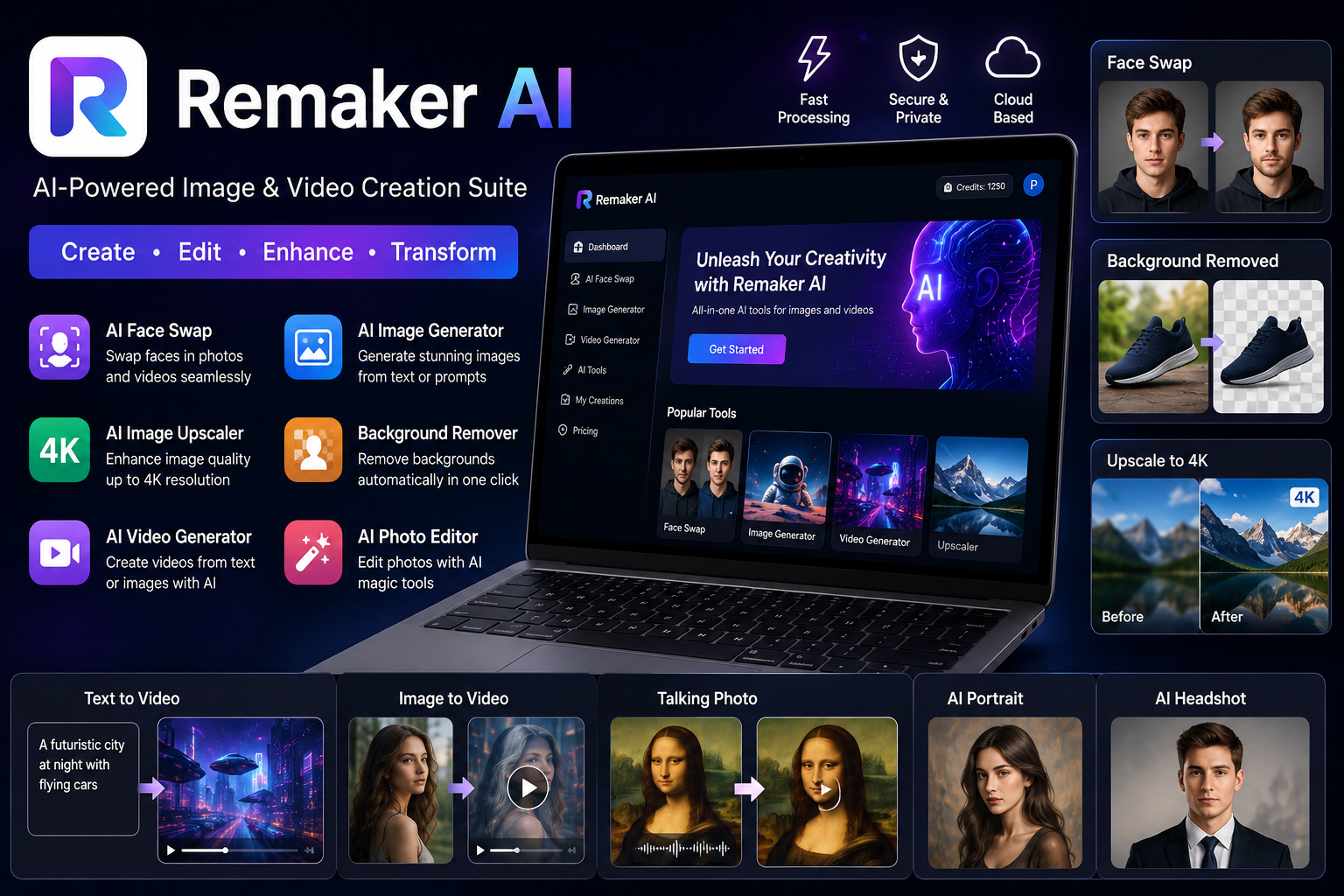
The platform brings multiple AI tools together in one browser-based workspace. These include AI face swapping, image generation, background removal, image upscaling, photo editing, video generation, video enhancement, portrait creation, talking photos, and other creative tools.
This makes the platform particularly interesting for content creators, social media users, marketers, e-commerce sellers, and anyone who needs visual content quickly.
Instead of opening different applications for every task, users can access several AI-powered functions from one platform.
In 2026, AI visual creation has become much more competitive, so convenience is an important factor. Remaker AI focuses on combining image editing, generation, enhancement, and video capabilities into a single service.
How Does Remaker AI Work?
Using Remaker AI is relatively straightforward.
Most tools follow a simple workflow:
- Open the Remaker AI platform.
- Select the AI tool you want to use.
- Upload an image or video, or enter a text prompt.
- Adjust available settings.
- Start the AI generation or editing process.
- Review the result.
- Download or export the finished content.
The current Stork review describes Remaker AI as a browser-based platform, meaning users generally do not need to install complicated desktop editing software.
This browser-based approach can be useful for beginners who want to experiment with AI creative tools without learning a traditional editing workflow.
Key Features of Remaker AI
1. AI Face Swap
Face swapping is one of the platform’s most prominent features.
Remaker AI supports image face swaps as well as video-related face-swapping capabilities. The current review also describes multi-face and batch-processing options.
AI face swapping can be useful for creative projects, entertainment, visual experiments, and certain marketing workflows.
However, users should only upload images or videos when they have the appropriate rights or permission to use them. AI editing does not remove copyright, privacy, or consent considerations.
2. AI Image Generator
Remaker AI also provides AI image-generation capabilities.
Users can create visual content from text or image-based prompts, making the platform useful for concept creation, social media graphics, creative experiments, and marketing visuals. The current Stork review lists support for several image-generation models, including Stable Diffusion variants, Seedream 4K, and Google Nano Banana.
The major advantage is convenience: users can generate and edit visual assets without switching between multiple applications.
3. AI Image Upscaler
Low-resolution images can be a problem when preparing content for websites, online stores, or social media.
Remaker AI includes an AI image upscaler that can enhance image resolution, with the current review listing support for outputs up to 4K.
An upscaling tool can be particularly useful when the original image is too small for a larger display.
However, upscaling does not magically recreate every missing detail. The final result depends on the quality and characteristics of the original image.
Read more: Gauth AI Review 2026
4. AI Background Remover
Removing backgrounds manually can take time, particularly when an image contains detailed edges.
Remaker AI provides automated background removal and batch processing. Stork’s current review states that batch background removal can handle up to 50 images.
This could be valuable for e-commerce sellers who need product images with consistent backgrounds.
For example, a seller may have multiple product photos and want to remove their existing backgrounds before placing the products on a clean website or marketplace design.
5. AI Video Generator
Video creation is another major part of the Remaker AI ecosystem.
The platform’s official AI Video Generator supports text-to-video and image-to-video workflows. Users can provide text or images and generate short video content without traditional video-editing expertise.
This can be useful for:
- Social media videos
- Product demonstrations
- Marketing content
- Short-form storytelling
- Educational visuals
- Creative experiments
The official tool currently provides video-generation controls such as resolution and video length.
6. Image-to-Video Generation
Remaker AI can also transform still images into dynamic video content.
Its official image-to-video tool explains that users can upload images and generate movement, transitions, and animations. The tool supports 16:9, 9:16, and 1:1 aspect ratios, making the output suitable for different types of social platforms.
This is especially useful when you already have a strong image but want to turn it into a short video.
For example, a product image can potentially be transformed into a more engaging promotional clip.
7. Text-to-Video
The text-to-video feature allows users to start with an idea, description, or script rather than an existing video.
According to Remaker AI’s official documentation, users can enter text and choose an appropriate video format before generating the content. The tool supports landscape, vertical, and square formats.
This can make it easier for creators to convert written concepts into visual content.
8. AI Photo Editor
Remaker AI also offers AI-assisted photo editing.
The current Stork review lists prompt-based editing, visual effects, and an object-removal feature called Magic Eraser among its capabilities.
Prompt-based editing can be helpful when a user wants to describe a change rather than manually perform every editing step.
For beginners, this can make basic visual editing more accessible.
9. Portrait, Headshot, and Talking Photo Tools
The platform also includes portrait and headshot-related generation features.
The current feature list includes an AI Portrait Generator, AI Headshot Generator, AI Tattoo Generator, and AI Talking Photo tool.
These tools expand Remaker AI beyond conventional photo enhancement into more experimental forms of AI-generated visual content.
Remaker AI for Social Media Creators
Social media creators need a constant supply of visual content.
Creating every image and video manually can take significant time. Remaker AI can help streamline parts of this process through image generation, background removal, photo editing, image-to-video, and text-to-video features.
For short-form platforms, the ability to generate vertical video is particularly useful. Remaker’s official image-to-video tool supports a 9:16 format alongside landscape and square options.
Creators can therefore experiment with different formats depending on where they plan to publish their content.
The important thing is to treat AI output as a creative starting point rather than assuming every generated asset will be publication-ready without review.
Read more: Should I Use Lopulgunzer
Remaker AI for E-Commerce
E-commerce sellers can also benefit from AI visual tools.
Product photography often requires clean backgrounds, consistent presentation, high-resolution images, and promotional visuals.
Remaker AI’s background remover, image upscaler, photo editor, and image-generation features can potentially support these workflows. The current review specifically identifies e-commerce businesses as one of the platform’s use cases.
For example, a seller could use AI background removal to prepare product photos and then use an image-generation or editing workflow to create additional marketing visuals.
However, product images should accurately represent the actual product. AI-generated changes that make a product look substantially different can mislead customers.
Remaker AI Pricing in 2026
One interesting aspect of Remaker AI is its credit-based pricing model.
According to the current Stork review, the platform uses one-time credit packages rather than a traditional recurring subscription model. The review lists free credits for new users, a 200-credit package for $5.99, and a 20,000-credit package for $299, with credits described as non-expiring.
The review also notes that pricing and payment information has undergone changes during 2026, so users should verify the current price and terms before purchasing credits.
This is important because AI tools frequently change their pricing, models, credit costs, and free allowances.
Is Remaker AI Free?
Remaker AI has offered free credits for new users, according to the current review.
However, the availability and amount of free usage can change. Before relying on a specific number of free credits, check the current pricing page and account dashboard.
The credit-based model can be attractive to occasional users because one-time purchases may be more suitable than paying for a monthly subscription.
How to Use Remaker AI
Getting started does not require advanced technical knowledge.
Step 1: Open the Platform
Access Remaker AI through a supported web browser.
Step 2: Choose a Tool
Select the feature that matches your project, such as Face Swap, Image Generator, Background Remover, Image Upscaler, or Video Generator.
Step 3: Upload or Enter Your Content
Depending on the tool, upload an image or video or enter a text prompt.
Step 4: Customize the Settings
Some tools provide options for aspect ratio, resolution, model selection, or other parameters.
Step 5: Generate the Result
Start the AI process and wait for the output.
Step 6: Review Carefully
Check the generated image or video for visual errors, unexpected changes, inaccurate details, or other problems.
Step 7: Export Your Content
If the result meets your requirements, export the finished file using the available download options.
This basic workflow is consistent with the process described in the current Stork review.
Pros and Cons of Remaker AI
Pros
- Wide range of AI image and video tools
- Browser-based workflow
- AI face swap capabilities
- Image-to-video and text-to-video features
- Background removal
- Image upscaling
- AI image generation
- Photo editing tools
- Useful for creators and e-commerce workflows
- Credit-based purchasing can suit occasional users
- API availability is listed in the current review
Cons
- AI-generated results are not always perfect
- Processing can take longer for larger files
- Pricing and payment policies may change
- Credit costs vary depending on the tool
- Users need to review outputs before publishing
- Privacy and consent should be considered when using face-related tools
The current Stork review also reports concerns around reliability, customer support, and changes to payment practices during 2026.
Is Remaker AI Safe to Use?
As with any online AI editing platform, users should think carefully about the files they upload.
Avoid uploading private, confidential, or sensitive material unless you understand how the platform handles that data.
Face-swap technology deserves particular care. Users should have permission to use images of other people and should avoid using AI editing to impersonate or mislead others.
For business users, it is also important to review the platform’s current terms and commercial-use conditions before using generated content in paid campaigns.
Who Should Use Remaker AI?
Remaker AI can be a useful option for several types of users.
Content Creators
Creators can experiment with AI-generated images, short videos, image-to-video animations, and photo editing.
E-Commerce Sellers
Online sellers can use background removal, image enhancement, and creative generation to prepare product-related visuals.
Digital Marketers
Marketers can create visual assets for campaigns, social media posts, presentations, and promotional content.
Beginners
Because the platform is browser-based and uses AI-assisted workflows, beginners can experiment without learning advanced editing software first.
Creative Professionals
Professionals can use AI tools for rapid concepts, variations, experimentation, and visual production.
Remaker AI vs Traditional Editing Software
Traditional editing software provides detailed manual control, which remains valuable for professional workflows.
Remaker AI takes a different approach: users describe what they want or provide source material, and AI performs much of the transformation.
That can make AI tools considerably faster for certain repetitive tasks.
However, AI does not completely replace traditional editing. Professional designers may still need detailed control over layers, typography, color, composition, animation, and final production.
The best approach may be to combine AI-assisted creation with conventional editing when a project requires precise control.
Is Remaker AI Worth Trying in 2026?
Remaker AI is an interesting option for users who want multiple AI creative tools in one place.
Its strongest areas include AI face swapping, image generation, background removal, image upscaling, photo editing, text-to-video, image-to-video, and AI video creation.
The platform is particularly appealing for creators and businesses that need to produce visual content quickly.
Its credit-based pricing model is another notable point because users can purchase credits without necessarily committing to a conventional monthly subscription, according to the current review.
Still, users should check the latest pricing and terms before purchasing because AI platforms can change their plans and policies.
Overall, Remaker AI is worth exploring if you want an accessible collection of AI tools for creating, editing, enhancing, and transforming images and videos. It is most useful when treated as a creative assistant rather than a replacement for human judgment.
Frequently Asked Questions About Remaker AI
What is Remaker AI?
Remaker AI is an AI-powered creative platform for generating, editing, enhancing, and transforming images and videos. Its tools include face swapping, image generation, background removal, upscaling, photo editing, and video generation.
Does Remaker AI have a face swap tool?
Yes. Face swapping is one of the platform’s major features, with support for image and video workflows.
Can Remaker AI generate videos?
Yes. Remaker AI provides text-to-video and image-to-video tools.
Can Remaker AI remove backgrounds?
Yes. The platform provides AI background removal and batch processing capabilities.
Does Remaker AI upscale images?
Yes. Its AI image upscaler can enhance image resolution, with the current review listing support up to 4K.
Is Remaker AI free?
The platform has offered free credits for new users, while additional usage can be purchased through credit packages. Because offers can change, users should check the current pricing information before signing up or purchasing.
Does Remaker AI require software installation?
The platform is primarily browser-based, so users can access its tools online without relying on traditional desktop editing software.
Is Remaker AI good for e-commerce?
It can be useful for e-commerce visual workflows such as background removal, image enhancement, and creating promotional visuals.
Final Thoughts
The AI creative-tool market is growing quickly, but Remaker AI stands out by bringing many different image and video functions into one platform.
From AI face swap and image generation to background removal, 4K upscaling, text-to-video, and image-to-video creation, the platform offers a broad set of capabilities for modern digital content production.
For beginners, the simple browser-based workflow can reduce the learning curve. For creators and businesses, the combination of editing and generation tools can help speed up visual production.
The main thing to remember is that AI-generated content should always be reviewed before publication. Accuracy, privacy, consent, copyright, and truthful representation still matter.
If you are looking for a single AI platform to experiment with image and video creation in 2026, Remaker AI is certainly a tool worth exploring.
SEO Tags
Remaker AI, Remaker AI review, Remaker AI 2026, Remaker AI pricing, Remaker AI face swap, Remaker AI image generator, Remaker AI video generator, Remaker AI upscaler, AI photo editor, AI video generator, AI image generator, Remaker AI free