What Is 2short AI?
Creating short-form videos from long content can take a surprising amount of time. A creator may have a podcast, interview, lecture, webinar, or YouTube video containing dozens of potentially useful moments, but manually finding and editing those moments can be tedious.
2short AI is designed to make this process easier.
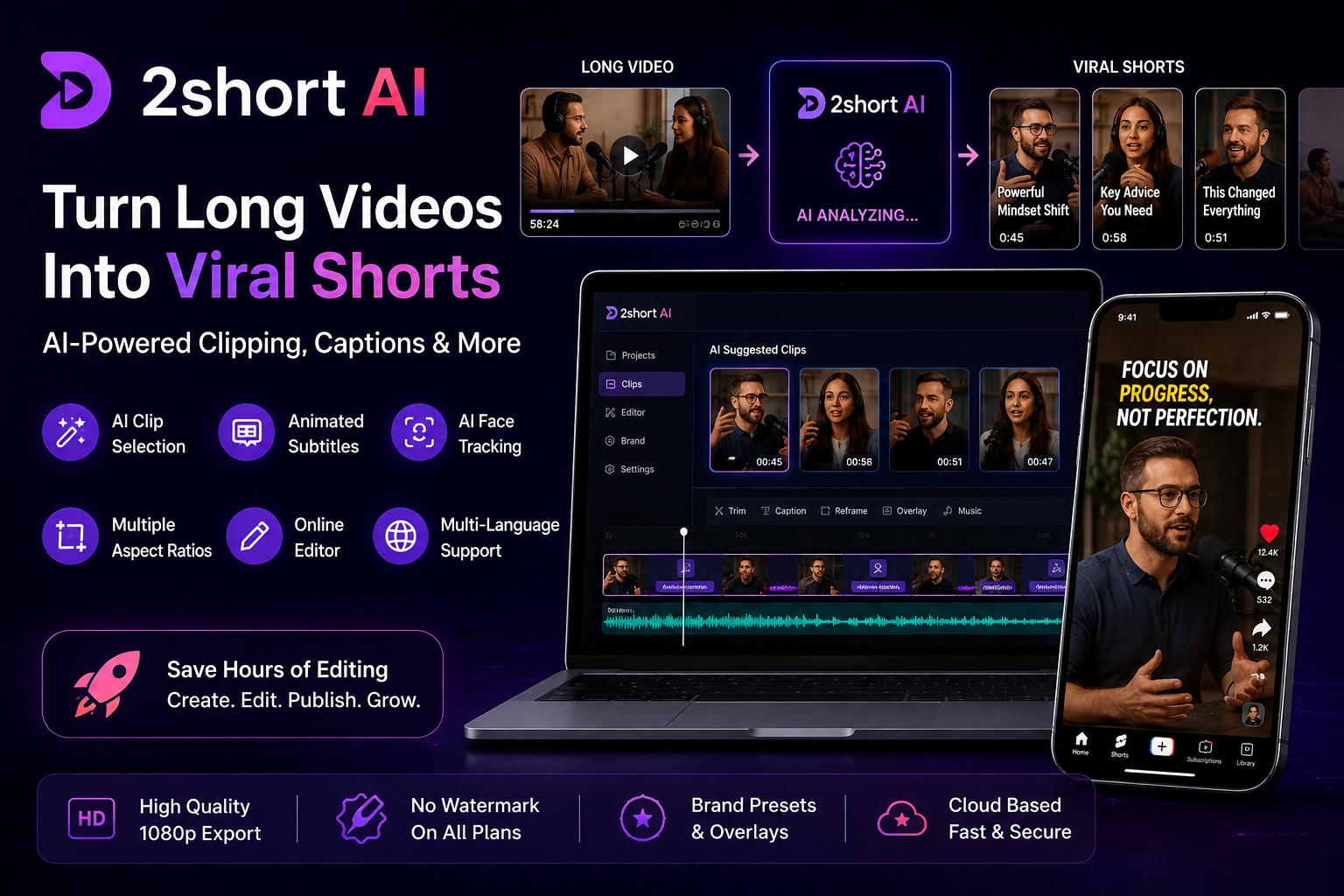
It is an AI-powered video repurposing platform that analyzes existing long-form videos and extracts short clips suitable for platforms such as YouTube Shorts, TikTok, and Instagram Reels. Instead of manually searching through an entire timeline, creators can use AI to identify potentially strong moments and then edit the generated clips before exporting them.
The important thing to understand is that 2short AI is primarily a repurposing tool. It works with existing video content rather than creating an entirely new video from nothing. This makes it particularly interesting for YouTubers, podcasters, educators, interview creators, and other people who already have long-form video libraries.
How Does 2short AI Work?
The basic workflow is relatively straightforward.
A creator provides a supported video source, such as a YouTube URL. 2short AI analyzes the video’s captions and identifies sections that can potentially work as standalone short-form clips.
The platform can then apply features such as animated subtitles and automatic framing. Users can review the results, make adjustments in the online editor, and export the finished clips.
According to the current official information, captions are important because the AI uses the source video’s caption information when analyzing content.
This workflow can save creators from repeatedly watching an entire long video just to find a few useful moments.
Read more: Henof 2026
Basic workflow:
- Select an existing video.
- Provide the supported video source.
- Let the AI analyze the content.
- Review the suggested clips.
- Adjust captions or framing if necessary.
- Export the finished short-form video.
- Publish it on the platform of your choice.
The exact options available can depend on the current plan and platform updates.
7 Powerful Features of 2short AI
1. AI-Powered Clip Selection
The main attraction of 2short AI is its ability to identify useful moments from longer videos.
Instead of manually scrubbing through a one-hour podcast or interview, creators can let the AI analyze the source and suggest sections that may work as short clips.
This is especially useful for spoken-word content where the video’s value is contained in conversations, explanations, opinions, stories, or educational material.
The official product describes the tool as identifying strong moments and extracting them into standalone clips.
However, AI selection should not be treated as perfect. A creator should still review every generated clip before publishing because context and meaning can sometimes change when a section is removed from a longer conversation.
2. Animated Subtitles
Captions are extremely useful for short-form video because many people watch social content with sound turned down or off.
2short AI provides automatically generated animated subtitles, reducing the need to manually create captions for every clip.
This can make the editing workflow faster, particularly for creators who publish frequently.
The captions can also make spoken content easier to follow. A podcast conversation, educational explanation, or interview can become more accessible when viewers can simultaneously read the words on screen.
Creators should still check automatically generated captions before publishing because speech recognition can occasionally produce errors.
3. AI Face Tracking
Another useful feature is automatic face tracking.
Long videos are often recorded horizontally, while short-form platforms generally favor vertical video. Simply cropping a horizontal video can sometimes cut the speaker out of the frame.
2short AI uses face tracking to keep the active speaker centered when converting content into a vertical format.
This is particularly useful for:
- Podcasts
- Interviews
- Talking-head videos
- Educational content
- Commentary
- Video presentations
Instead of manually adjusting the crop throughout a clip, the automated system handles much of the framing work.
4. Multiple Aspect Ratios
Different platforms have different video-format requirements.
2short AI supports vertical, square, and horizontal aspect ratios, giving creators more flexibility when preparing content for different destinations.
Vertical video is particularly useful for Shorts, Reels, and TikTok-style content.
This flexibility means creators don’t necessarily have to create separate projects from scratch every time they want to use the same content in a different format.
Read more: Cruzdid.com Review 2026
5. Online Editing Tools
Automation is useful, but creators often want some control over the final result.
2short AI includes an online editor that lets users make adjustments before exporting. The available workflow includes trimming, reframing, and caption adjustments.
This is important because AI-generated clips aren’t always perfect.
For example, you may want to:
- Remove an unnecessary opening sentence
- Adjust the framing
- Correct a caption
- Change subtitle styling
- Improve the beginning of the clip
- Remove an awkward ending
Having an editor available means creators can refine the AI output rather than publishing the first result automatically.
6. Multi-Language Support
Another useful capability is support for content in multiple languages.
This can make 2short AI more interesting for international creators who publish content outside English. The platform’s current product information describes processing and captioning for multiple languages.
For creators building audiences in different regions, multilingual captioning can reduce some of the repetitive work involved in preparing short-form content.
The exact language coverage and performance can change over time, so creators should test their particular language and content style before relying on it for a large production workflow.
7. High-Quality Exports and Branding
The official 2short.ai site currently highlights high-quality exports, including 1080p output, with no watermark on its plans. It also lists brand presets that can add logos and overlays to exported videos.
Branding can be useful for creators who want their short clips to maintain a consistent visual identity.
For example, a creator may use the same logo, overlay, or visual treatment across multiple clips.
This becomes particularly useful when publishing a large number of videos from an established channel.
2short AI Pricing in 2026
The current official pricing page lists four main plans. Prices and included limits can change, so users should verify the latest details before purchasing.
| Plan | Price | AI Video Analysis |
|---|---|---|
| Starter | Free | 30 minutes/month |
| Lite | $9.90/month | 5 hours/month |
| Pro | $19.90/month | 15 hours/month |
| Premium | $49.90/month | 50 hours/month |
The Starter plan provides a way to test the platform without paying. The Lite plan increases analysis time and adds features such as Google Drive and public-URL imports. The Pro plan provides substantially more analysis time and unlimited fast server-side exports, while Premium adds 50 hours of AI analysis plus priority support and access to newer beta features.
For someone just experimenting with AI video repurposing, starting with the free option can be a sensible way to understand the workflow before deciding whether a paid plan is worthwhile.
Who Should Use 2short AI?
2short AI is particularly suitable for creators who already have long-form videos.
YouTubers
YouTubers can turn existing long videos into additional short-form content instead of creating every Short from scratch.
Podcasters
Podcasts often contain many conversations and interesting moments that can work independently as short clips.
Interview Creators
Interviews can contain strong quotes, explanations, or reactions that are suitable for short-form distribution.
Educators
Teachers and educational creators can use short clips to highlight individual concepts from longer lessons.
Coaches and Commentators
People who publish spoken-word educational or commentary content can potentially save editing time by automating the initial clip-selection process.
The official review also notes that the tool is especially suited to spoken-word content such as podcasts, interviews, and educational videos.
Who May Not Need 2short AI?
Not every creator needs an AI clipping tool.
If you primarily create cinematic videos, music videos, gaming montages, heavily scripted visual content, or footage where visual storytelling matters more than spoken dialogue, an automatic spoken-content clipping workflow may be less useful.
The quality of AI-selected clips can also vary depending on the source material. The tool is strongest when the original video has clear spoken content and useful captions.
Therefore, it is better to think of 2short AI as a specialized video-repurposing assistant rather than a complete replacement for professional video editing software.
Pros and Cons of 2short AI
Pros
- AI-assisted clip selection
- Automatic animated subtitles
- Face tracking
- Multiple aspect ratios
- Browser-based workflow
- Useful for long-form spoken content
- Free plan available
- High-quality exports
- Branding options
- Can reduce repetitive editing work
These features make it attractive for creators who regularly need to convert long videos into multiple short clips.
Cons
- AI selections still need human review
- Primarily designed for existing content
- Results can vary by source video
- Less suitable for highly visual content
- Editing capabilities are not intended to replace a full professional editor
- Plan limits apply to AI analysis
The source material also matters from a rights perspective. If you are repurposing someone else’s video, having access to the video does not automatically mean you have permission to republish edited versions of it. Creators should make sure they have the necessary rights before publishing.
Is 2short AI Easy to Use?
One of the biggest advantages of 2short AI is the relatively simple workflow.
The idea is straightforward: provide existing content, allow the AI to analyze it, review the suggested clips, make any necessary changes, and export.
This is much easier for beginners than learning a complex professional editing timeline.
At the same time, experienced creators can benefit because the tool can reduce repetitive work.
Instead of spending a large amount of time locating possible clips manually, creators can use AI as the first stage of the editing process and then concentrate on reviewing and improving the results.
2short AI vs Manual Editing
Manual editing provides maximum control.
A professional editor can watch the entire video, understand the context, select precise moments, create transitions, customize captions, adjust audio, and produce a highly polished final result.
The downside is time.
2short AI takes a different approach. It prioritizes speed and automation.
The ideal workflow may therefore be a combination of both:
AI selection → Human review → Final editing → Publishing
This gives creators the efficiency of automation while keeping human judgment involved in the final product.
Is 2short AI Worth It in 2026?
For creators who already produce long-form spoken videos, 2short AI can be a useful addition to a content workflow.
Its strongest advantage is not that it completely replaces editing. Instead, it helps automate some of the repetitive work involved in finding highlights, creating captions, reframing videos, and preparing clips for short-form platforms.
The free Starter plan also gives users a low-risk way to test the service before committing to a subscription.
However, creators should maintain realistic expectations. AI can make editing faster, but it cannot always understand context as well as a human editor. Every clip should be reviewed before publishing.
Frequently Asked Questions About 2short AI
What is 2short AI?
2short AI is an AI-powered video repurposing platform designed to extract short clips from longer videos and prepare them for short-form platforms.
Is 2short AI free?
Yes. The current official pricing page lists a free Starter plan with 30 minutes of AI video analysis per month. Paid plans provide larger analysis limits and additional capabilities.
Can 2short AI create YouTube Shorts?
Yes. Its primary purpose is to turn existing long-form videos into short-form clips suitable for platforms including YouTube Shorts, TikTok, and Instagram Reels.
Does 2short AI add captions?
Yes. Animated subtitles are one of the platform’s main features.
Does 2short AI support face tracking?
Yes. Its AI face-tracking feature helps keep the active speaker centered when converting landscape video into vertical formats.
Is 2short AI good for podcasts?
It can be particularly useful for podcasts because the platform is designed around identifying useful moments in spoken-word content.
Does 2short AI replace a video editor?
Not completely. It automates several repetitive tasks, but human review and additional editing can still be valuable for producing polished content.
Final Verdict
2short AI is a focused AI video-repurposing platform built for creators who want to transform long-form content into short videos more efficiently.
Its strongest features include AI clip selection, animated captions, face tracking, multiple aspect ratios, online editing, multilingual support, and high-quality exports.
The platform makes the most sense for YouTubers, podcasters, interview creators, educators, and other creators who already have a library of long-form spoken content.
It is not a magic button that guarantees viral videos. The AI can accelerate the editing process, but creators still need to review clips, maintain context, improve hooks when necessary, and make sure they have the right to use the source material.
Overall, if your main goal is turning existing long videos into short-form content without doing every editing step manually, 2short AI is worth testing—especially because its current free plan provides an opportunity to explore the workflow before upgrading.